Your website plays an important role in attracting customers, generating leads, and building your brand’s online reputation. However, launching a website is only the beginning. To keep it secure, functional, and competitive, you need to perform regular maintenance. Without consistent attention, outdated software, broken links, slow-loading pages, and security vulnerabilities can negatively affect your visitors’ experience and business performance.
A monthly website maintenance checklist helps you identify potential problems before they become expensive issues. Whether you operate a small business website, corporate website, or eCommerce store, prioritizing essential maintenance activities ensures your website continues supporting your business goals.
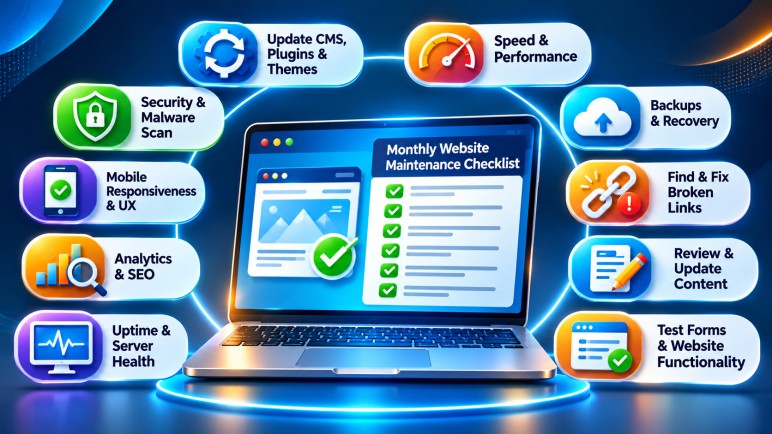
Here are 10 important website maintenance tasks you should prioritize every month.
1. Check Website Security and Scan for Malware
Website security should always be a priority. Cyberattacks, malware infections, and unauthorized access can compromise customer information and damage your business reputation.
Start by running a security scan to identify suspicious files, malware, vulnerabilities, and unusual activities. Review user permissions, change weak passwords, and enable additional security measures such as two-factor authentication.
You should also check your SSL certificate to ensure your website maintains a secure HTTPS connection. Addressing security concerns regularly reduces potential risks and protects your visitors’ information.
2. Update Your CMS, Plugins, and Themes
If your website uses WordPress or another content management system (CMS), check for available software updates every month. Outdated CMS versions, plugins, and themes can create compatibility problems and expose your website to security vulnerabilities.
Before installing updates, create a complete website backup. Then update the necessary components and check whether your website continues functioning correctly.
Test important features, including navigation menus, forms, shopping carts, and interactive elements. Remove unused plugins and themes that could introduce unnecessary security risks.
3. Monitor Website Speed and Performance
Your website’s loading speed directly influences user experience. Visitors may leave if your pages take too long to load, potentially reducing engagement and conversions.
Use tools such as Google PageSpeed Insights to evaluate website performance. Check Core Web Vitals, image sizes, server response times, browser caching, and unnecessary scripts.
Compress large images, remove unused resources, and optimize your website’s code where necessary. Pay particular attention to mobile performance because many potential customers browse websites through smartphones.
Consistent performance monitoring helps you identify speed-related problems before they affect customer satisfaction.
4. Review Website Backups
A reliable backup protects your business against unexpected data loss caused by hacking, server failures, accidental deletions, or unsuccessful updates.
Check whether your website backup completed successfully during the month. Ideally, maintain automated backups with copies stored in a separate, secure location.
Do not simply assume that a backup is working. Test the restoration process periodically to confirm that your files and database can be recovered when necessary.
Your backup schedule should reflect how frequently your website changes. An eCommerce website with daily transactions may require more frequent backups than a simple informational website.
5. Find and Fix Broken Links
Broken internal and external links create frustrating experiences for visitors. They can also interfere with website crawling and make it difficult for search engines to understand your website structure.
Use website crawling tools to identify broken links, missing pages, incorrect redirects, and 404 errors.
Review important navigation links, product pages, blog articles, and contact information. Update incorrect URLs or redirect permanently moved pages to relevant destinations.
Make sure your website does not contain unnecessary redirect chains or links pointing to irrelevant content. A clean linking structure supports navigation, usability, and technical SEO.
6. Review and Update Website Content
Outdated website content can reduce visitor confidence. Incorrect pricing, expired promotions, outdated business information, and old service descriptions may prevent potential customers from taking action.
Review your homepage, service pages, product descriptions, blog posts, and frequently asked questions every month.
Update statistics, replace outdated information, correct spelling mistakes, and add relevant details where necessary. Ensure your business hours, contact information, and service descriptions remain accurate.
You should also identify opportunities to improve existing content based on customer questions and changing search intent. Fresh, helpful, and accurate information makes your website more valuable to visitors.
7. Check Contact Forms and Website Functionality
Your contact forms, inquiry buttons, booking systems, and checkout processes help convert website visitors into customers.
Test these features monthly to ensure they work correctly. Submit test inquiries, verify email notifications, and check whether submitted information reaches the appropriate destination.
For eCommerce websites, test product selection, shopping cart functionality, payment gateways, and order confirmation messages.
Also review navigation menus, downloadable resources, interactive elements, and important calls to action. Even a small technical issue can prevent visitors from completing an important action.
8. Monitor Website Uptime and Server Health
Website downtime can result in missed inquiries, lost sales, and reduced customer trust. Regular uptime monitoring helps you identify availability problems before they affect too many visitors.
Use monitoring tools to track server availability, response times, and unexpected outages. Review hosting performance and investigate recurring downtime or server errors.
Check available server storage, database health, and resource usage if your hosting environment provides these details.
If your website experiences repeated outages, contact your hosting provider or technical support team to identify the underlying problem.
9. Review Website Analytics and SEO Performance
Monthly maintenance should include reviewing how visitors interact with your website. Google Analytics 4 and Google Search Console can help you understand website traffic, user engagement, search visibility, and technical issues.
Monitor important metrics such as organic traffic, landing page performance, conversions, click-through rates, and indexing errors.
Look for unexpected traffic declines, pages losing visibility, and changes in visitor behavior. Check whether important pages are indexed and whether search engines can access your content.
Use these insights to identify improvements that support your marketing objectives. Remember that website maintenance should protect not only technical performance but also your website’s ability to generate business opportunities.
10. Check Mobile Responsiveness and User Experience
Your website should provide a consistent browsing experience across smartphones, tablets, laptops, and desktop computers.
Test important pages on different screen sizes. Check text readability, image alignment, navigation menus, button placement, and form usability.
Pay attention to elements that may overlap, disappear, or become difficult to use on smaller screens.
Review the overall visitor journey, from entering your homepage to finding information and submitting an inquiry. Fix unnecessary steps and confusing navigation elements to make important actions easier.
Why Should You Follow a Monthly Website Maintenance Checklist?
A structured maintenance routine helps you prevent technical problems, strengthen website security, improve performance, and maintain accurate business information.
However, managing all these activities internally can become challenging when you have limited technical knowledge or time. Professional support can help you maintain consistency and address problems before they affect your business.
With the right Website Maintenance Packages, you can access essential maintenance activities such as website backups, uptime monitoring, security checks, software updates, performance optimization, and technical troubleshooting.
A suitable maintenance plan should match your website’s complexity, update frequency, security requirements, and business objectives.
Keep Your Website Business-Ready with Professional Maintenance
Your website needs ongoing attention to remain secure, reliable, and useful to your customers. Following these 10 monthly maintenance tasks gives you a practical foundation for identifying problems, improving website performance, and protecting your online investment.
If you need assistance with technical updates, website security, content changes, or ongoing performance monitoring, explore professional Website Maintenance Services to support your website’s long-term health.
With experience in digital marketing and website development, JDM Web Technologies helps businesses maintain their online presence through website-related solutions and ongoing technical support.
Ready to simplify your website maintenance routine? Contact the team to discuss your website’s requirements and find a suitable maintenance solution. Visit the professional website maintenance consultation and inquiry page to get started.
Frequently Asked Questions (FAQs)
1. What should you include in a monthly website maintenance checklist?
Your checklist should include security scans, software updates, website backups, speed testing, broken link checks, content reviews, contact form testing, uptime monitoring, SEO analysis, and mobile responsiveness checks.
2. How often should you perform website maintenance?
You should review your website at least once a month. However, security monitoring, backups, and uptime checks may need to happen daily or continuously, depending on your website’s complexity and business requirements.
3. Why are website backups important?
Website backups protect your files, databases, and business information against accidental deletions, cyberattacks, server failures, and unsuccessful updates. They also help you restore your website when unexpected problems occur.
4. Can monthly website maintenance improve SEO?
Yes. Regular maintenance helps improve technical performance by addressing broken links, slow-loading pages, indexing issues, mobile usability problems, and outdated content. These improvements support a better experience for visitors and search engines.
5. Should you hire professionals for monthly website maintenance?
Professional maintenance is useful when you lack technical expertise or time to manage updates, backups, security, and troubleshooting. A qualified provider can help you maintain website reliability and address technical issues efficiently.