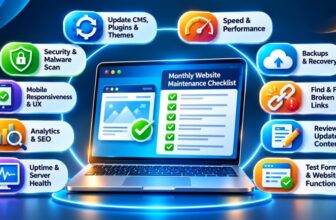
Website maintenance plays an important role in preventing unexpected technical problems, protecting your business data, and keeping your website available to customers. Although you cannot eliminate every risk, regular maintenance helps you identify small issues before they develop into expensive emergencies.
If your website supports sales, lead generation, bookings, or customer communication, even a few hours of downtime can affect revenue and trust. By monitoring performance, updating software, checking security, and maintaining reliable backups, you can reduce the likelihood of sudden failures and make problems easier to resolve.
How Does Website Maintenance Prevent Emergency Repairs?
Website emergencies rarely appear without warning. An outdated plugin, a failed backup, an overloaded server, or an overlooked security vulnerability can gradually create conditions for a major failure. Routine maintenance helps you detect these warning signs before they disrupt essential website functions.
Instead of waiting until a page stops loading or a contact form fails, you can follow a preventive maintenance schedule. This approach makes website management more predictable, reduces avoidable repair costs, and gives you greater control over your digital operations.
1. Identifying Technical Problems Before They Escalate
Small technical issues can become serious when nobody notices them. Broken links, database errors, missing images, slow-loading pages, and server warnings may initially seem harmless. However, these problems can eventually affect customer experience, conversions, and search visibility.
Regular website inspections help you identify and resolve these issues early. You should test important pages, review error logs, check forms, and confirm that navigation works correctly on desktop and mobile devices.
For example, discovering a broken checkout button during a routine inspection is far less disruptive than finding it after customers have abandoned multiple purchases. Early detection helps you avoid unnecessary downtime and urgent developer intervention.
2. Keeping Your Website Software Updated
Your website’s content management system, plugins, themes, and server components need appropriate updates to remain secure and compatible. Outdated software may introduce vulnerabilities, cause functionality conflicts, or prevent important features from working properly.
However, installing every update immediately without testing can also create problems. Before making significant changes, you should create a fresh backup, review compatibility requirements, and test critical functionality in a staging environment whenever possible.
Consistent monitoring and planned updates help you manage these risks. If you need structured support for ongoing website upkeep, explore professional website maintenance packages that can help you organize routine checks, updates, and preventive tasks according to your website’s requirements.
3. Preventing Security Breaches and Data Loss
Security incidents are among the most disruptive website emergencies. Malware infections, unauthorized access, compromised administrator accounts, and outdated security components can expose sensitive information or make your website unavailable.
To reduce these risks, use strong passwords, enable multifactor authentication, limit administrative permissions, and regularly scan your website for suspicious activity. You should also monitor SSL certificate validity and review security alerts instead of ignoring them.
Reliable backups are equally important. Maintain copies of your website files and database in a secure, separate location. Test the restoration process periodically so you know the backups actually work. If an attack or failed update damages your website, a verified backup can help you recover without rebuilding everything from scratch.
4. Monitoring Website Performance and Uptime
Slow response times, server resource limitations, and sudden traffic increases can cause your website to become unavailable. If you only check your website manually, you may not notice an outage until a customer reports it.
Automated uptime monitoring can alert you when your website becomes inaccessible. Performance monitoring can also reveal unusually high resource usage, slow database queries, and pages that take too long to load.
Create a practical monitoring routine that includes the following checks:
- Uptime: Confirm that important pages remain accessible.
- Page speed: Identify slow-loading pages and heavy resources.
- Forms and transactions: Test lead submissions, bookings, and checkout processes.
- Server health: Review storage capacity, error logs, and resource usage.
- Mobile usability: Confirm that navigation and interactive features work across devices.
These checks help you respond to developing issues before they affect a larger portion of your audience.
5. Establishing a Reliable Maintenance Schedule
Preventive maintenance works best when you follow a consistent schedule rather than waiting for visible problems. The frequency of each task should depend on your website’s complexity, traffic, technology, and business importance.
A practical starting point is to review critical functions weekly, check updates and security alerts regularly, verify backups, and conduct a more comprehensive technical review monthly. High-traffic ecommerce websites may require more frequent monitoring than small informational websites.
Professional website maintenance services for security and performance can help you organize these activities, identify recurring issues, and establish a clear process for resolving technical problems. Before choosing a provider, confirm which monitoring, backup, recovery, and emergency support tasks are included.
6. Reducing Repair Costs Through Early Intervention
Emergency repairs often cost more because they require immediate attention, urgent troubleshooting, and sometimes after-hours support. A serious failure can also create indirect expenses through lost sales, missed enquiries, interrupted operations, and reduced customer confidence.
Routine maintenance helps you identify recurring errors, plan software upgrades, and resolve compatibility issues during scheduled maintenance windows. It also gives your technical team useful information about your website’s condition before a failure occurs.
However, maintenance does not guarantee that emergencies will never happen. Hosting outages, third-party service failures, hardware problems, and sophisticated cyberattacks can still occur. A realistic strategy combines preventive maintenance with a documented incident response and recovery plan.
7. Protecting Search Visibility and Customer Trust
Technical website problems can affect more than functionality. Broken pages, prolonged downtime, slow performance, and security warnings may prevent visitors and search engine crawlers from accessing important content.
Regular maintenance helps you identify these problems, preserve working internal links, maintain mobile usability, and ensure that important business information remains accurate. These improvements support a dependable user experience and help search engines access your content.
For businesses serving specific geographic markets, you should also verify that location pages, business details, contact information, and local service descriptions remain consistent. Clear, accurate information makes it easier for customers and search systems to understand what your business offers and where you operate.
A reliable website is also a stronger foundation for AI-powered search visibility because accessible pages, well-organized content, and consistent business information help systems interpret your expertise. Explore how JDM Web Technologies supports business websites to understand the wider digital services available for maintaining and improving your online presence.
How Can You Build a Preventive Website Maintenance Plan?
Start by identifying the pages and functions your business cannot afford to lose. Prioritize checkout systems, enquiry forms, customer portals, booking tools, and other revenue-generating features.
Next, assign responsibility for updates, backups, security checks, and performance monitoring. Keep records of completed tasks, recurring errors, and changes made to your website. This information helps you recognize patterns and make informed decisions about future improvements.
If you manage a business website in India or serve customers internationally, choose a maintenance process that accounts for your operating hours, customer expectations, and support requirements. A documented plan makes it easier to coordinate routine maintenance and respond quickly when something goes wrong.
The goal is simple: detect problems early, minimize disruption, and keep your website dependable as your business grows.
Frequently Asked Questions
1. Can website maintenance prevent emergency repairs completely?
No. Regular maintenance reduces the risk of many preventable failures, but external outages, cyberattacks, and unexpected software or hardware problems can still occur. Backups and recovery procedures provide additional protection.
2. How often should you maintain your website?
Monitor uptime and security alerts regularly, review critical functionality weekly, and schedule comprehensive maintenance checks monthly. Complex or high-traffic websites may need more frequent inspections.
3. Does website maintenance reduce repair costs?
Yes, it can reduce avoidable expenses by identifying problems early, preventing some security incidents, and allowing planned updates. Actual savings depend on your website, maintenance scope, and the issues you avoid.
4. Why are website backups important for emergency recovery?
Backups preserve website files, databases, and other essential information. If an update fails, data becomes corrupted, or a security incident damages your site, a recent, tested backup can help restore operations.
5. Should you hire a professional website maintenance company?
Professional support can help you manage security, updates, backups, performance checks, and technical troubleshooting. It is particularly useful when your website supports essential business operations or you lack in-house technical expertise.
Keep Your Website Prepared for the Unexpected
Preventive maintenance is an investment in website reliability, customer confidence, and business continuity. Rather than waiting for a technical failure to interrupt your operations, establish a maintenance routine that helps you identify risks and address them early.
If your website needs a more structured maintenance strategy, contact JDM Web Technologies for website maintenance support to discuss your requirements and find a suitable approach for keeping your website secure, functional, and reliable.